
Running an online store means dozens of small recurring tasks: orders, shipments, listings, messages and reports. ClickUp for e-commerce keeps all of them in one place, so nothing slips when you, your team or your virtual assistant are busy. I set up and run ClickUp workflows for a US seller on Amazon, eBay and Whatnot, and this is the simple structure that works.
Key Takeaways
- Use one Space for e-commerce with a List for each recurring workflow.
- Add custom fields like Order ID, Channel, SKU and Status so tasks are searchable.
- Turn every repeat process into a recurring task with a checklist.
- Keep SOPs in ClickUp Docs next to the tasks they explain.
Table of Contents
Real example
See the ClickUp, Sellerboard and ShippingEasy setups I use with real clients
Why ClickUp Works for Online Sellers
Marketplaces give you dashboards, but they do not tell you who is doing what. ClickUp adds that missing layer: clear owners, due dates, checklists and comments on every task. It has a free plan for small teams, and paid plans add more storage, automations and views.
For sellers who work with a virtual assistant, it becomes the shared to-do list: the owner adds priorities, the VA updates progress, and both can see what is done without chasing messages.
A Simple Structure: Space, Folders and Lists
| Level | Example | Purpose |
|---|---|---|
| Space | E-commerce | Everything store-related in one place |
| Folder | Amazon, eBay, Whatnot, Shopify | One folder per sales channel |
| List | Daily Orders, FBA Shipments, Listings, Customer Service, Reports | One list per recurring workflow |
| Docs | SOPs and checklists | How each task is done, step by step |
Keep it simple. Too many folders make ClickUp harder to use than the problems it solves.
Useful Custom Fields
- Order ID: to link a task to a specific order or case
- Channel: Amazon, eBay, Whatnot, Shopify
- SKU / ASIN: for listing and inventory tasks
- Amount: for reimbursements, refunds or profit checks
- Priority: so urgent account-health issues jump to the top
5 Ready-Made E-commerce Workflows
1. Daily FBM order profit check
A recurring daily list that makes sure every merchant-fulfilled order is checked for profit:
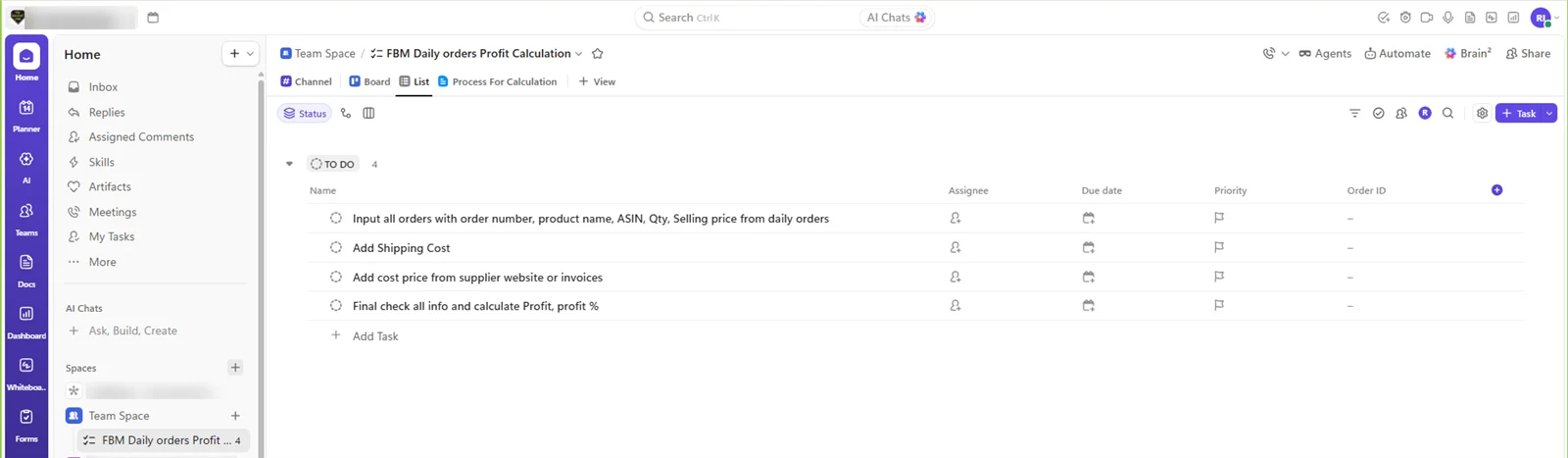
- Input all orders with order number, product name, ASIN, quantity and selling price.
- Add the shipping cost.
- Add the cost price from the supplier website or invoices.
- Final check and calculate profit and profit %.
2. FBA shipment preparation
Checklist: create the batch, add buy costs, print labels, book the carrier, confirm delivery, and reconcile received units.
3. New listing pipeline
Board view with columns: To research → Data collected → Listing created → Images added → Live → Checked. Each card is one product.
4. Customer service queue
One task per open case (returns, missing items, A-to-z claims) with the Order ID field and a due date before the marketplace deadline.
5. Weekly report
A recurring task every Monday with a checklist: sales, refunds, account health, open cases, restock needs and next week’s priorities.
Recurring Tasks and Automations
Set every routine task to repeat (daily, weekly or monthly) and copy its checklist automatically. Simple automations save even more time: assign new tasks in a list to your VA, move tasks to “Needs review” when checklists are complete, or notify the owner when a high-priority task is added.
Running ClickUp With a Virtual Assistant
- Owner: adds priorities and approves anything involving money or policy.
- VA: runs the recurring workflows, updates statuses and comments with results.
- Both: review the weekly report task in a short video call.
This is the same rhythm I describe in how to work with a virtual assistant: one place for tasks, written SOPs and a weekly check-in.
Frequently Asked Questions
Is ClickUp good for e-commerce?
Yes. ClickUp works well for online sellers because recurring tasks, checklists and custom fields keep daily store operations organised across channels like Amazon, eBay and Shopify.
Is there a ClickUp e-commerce template?
ClickUp offers templates, but a simple custom setup often works better: one e-commerce Space, a folder per channel and a list per workflow such as orders, shipments, listings and support.
Is ClickUp free?
ClickUp has a free plan that suits small teams. Paid plans add more storage, automations and advanced views.
How do virtual assistants use ClickUp?
Virtual assistants use ClickUp to run recurring tasks from checklists, update task statuses, log order IDs and send weekly reports, so the owner can see progress without extra messages.
Can you set up ClickUp for my store?
Yes. I can build your e-commerce Space, workflows and SOPs in ClickUp and run the daily tasks for you at $5–7 per hour.
Conclusion
ClickUp for e-commerce does not need to be complicated. One Space, a folder per channel, a list per workflow, a few custom fields and recurring checklists are enough to keep orders, shipments, listings and support running smoothly, especially when you work with a virtual assistant.
Virtual Assistant Services
Want your store workflows organised and run for you? See my virtual assistant services and the tools I use.
📌 Save this guide for later
Pin it to your Pinterest board so you can find it again when you need it.

About the Author
Rahana Islam
Virtual Assistant & E-commerce Specialist with 7+ years of remote experience supporting businesses in the United States, Denmark and worldwide with WordPress, Shopify, Amazon, Walmart and eBay operations. Level 2 Fiverr seller with a 5.0★ rating from 167 reviews, an NSDA-certified trainer & assessor and the #1 LEDP earner of Dhaka district.
Want Your Store Running Like Clockwork?
I set up ClickUp workflows and run daily e-commerce tasks for sellers at $5–7/hour.