Want to learn how to sell on Whatnot? Whatnot is a live shopping app where sellers run auctions, Buy It Now sales and giveaways during live video shows. It has grown fast in collectibles, sports cards, sneakers, fashion and more. I help a US sports retailer prepare listings and shows on Whatnot, so this guide covers the exact steps a beginner needs, from setting up Seller Hub to shipping your first orders.
Key Takeaways
- Whatnot sellers sell mainly through live shows, but you can also list Buy It Now items in the marketplace.
- Set up payouts, shipping profiles and a few strong listings before your first show.
- Plan every show with a run sheet, a clear thumbnail and a giveaway to grow followers.
- Ship fast and reply quickly: ratings and ship time decide how much buyers trust you.
Table of Contents
- What Is Whatnot and How Does It Work?
- Is Whatnot Right for You?
- Step 1: Apply to Become a Seller
- Step 2: Set Up Seller Hub
- Step 3: Create Your First Listings
- Step 4: Plan Your First Live Show
- Step 5: Go Live and Sell
- Step 6: Pack and Ship Fast
- Can You Sell on Whatnot Without Going Live?
- Whatnot Fees for Sellers
- 10 Whatnot Seller Tips for Beginners
- When to Get a Whatnot Assistant
- Frequently Asked Questions
- Conclusion
Free presentation for students & teachers
17 slides · PowerPoint (.pptx), opens in Google Slides & Keynote · free to use with credit
Real example
Need help preparing listings, moderating chat or shipping after your shows?
What Is Whatnot and How Does It Work?
Whatnot is a live shopping marketplace. Sellers go live on video, show products and sell them through quick auctions, fixed-price Buy It Now items and giveaways. Buyers watch, chat, bid and pay inside the app, and the seller ships the orders after the show.
The live format rewards personality and speed. A good show feels like an event: buyers come back for your regular time slot, follow you for giveaways and buy items they would never search for on a normal marketplace.
Is Whatnot Right for You?
Whatnot works best if you:
- Sell collectibles, sports products, trading cards, sneakers, fashion, toys or other items people love to talk about
- Are comfortable on camera, or have someone who is
- Can keep a steady supply of products for regular shows
- Can pack and ship orders quickly after each show
Many sellers add Whatnot as an extra channel next to eBay, Amazon or Shopify. That is how my client uses it: the same stock is sold across several channels, and quantities are kept in sync.
Step 1: Apply to Become a Seller
Download the Whatnot app or open the website, create an account and apply to sell from your profile. Whatnot asks about what you sell, your experience and where you sell today. Linking existing seller profiles (for example eBay or Instagram) and showing real inventory helps your application.
Approval can take some time, so use the waiting period to watch shows in your category. Note how top sellers open their shows, run giveaways and talk about products.
Step 2: Set Up Seller Hub
Once approved, you manage everything in Seller Hub. Before listing anything, set up:
- Payouts: connect the bank account where you want to be paid.
- Shipping profiles: choose profiles by weight so buyers see the right shipping cost.
- Return policy and store details: a clear profile builds trust with new buyers.
- Team access: add a moderator or assistant if someone helps you, so you never share your password.
Step 3: Create Your First Listings
In Seller Hub, open Create Listing. You will add photos or video, choose a category, write a title and description, and set the price and shipping profile.
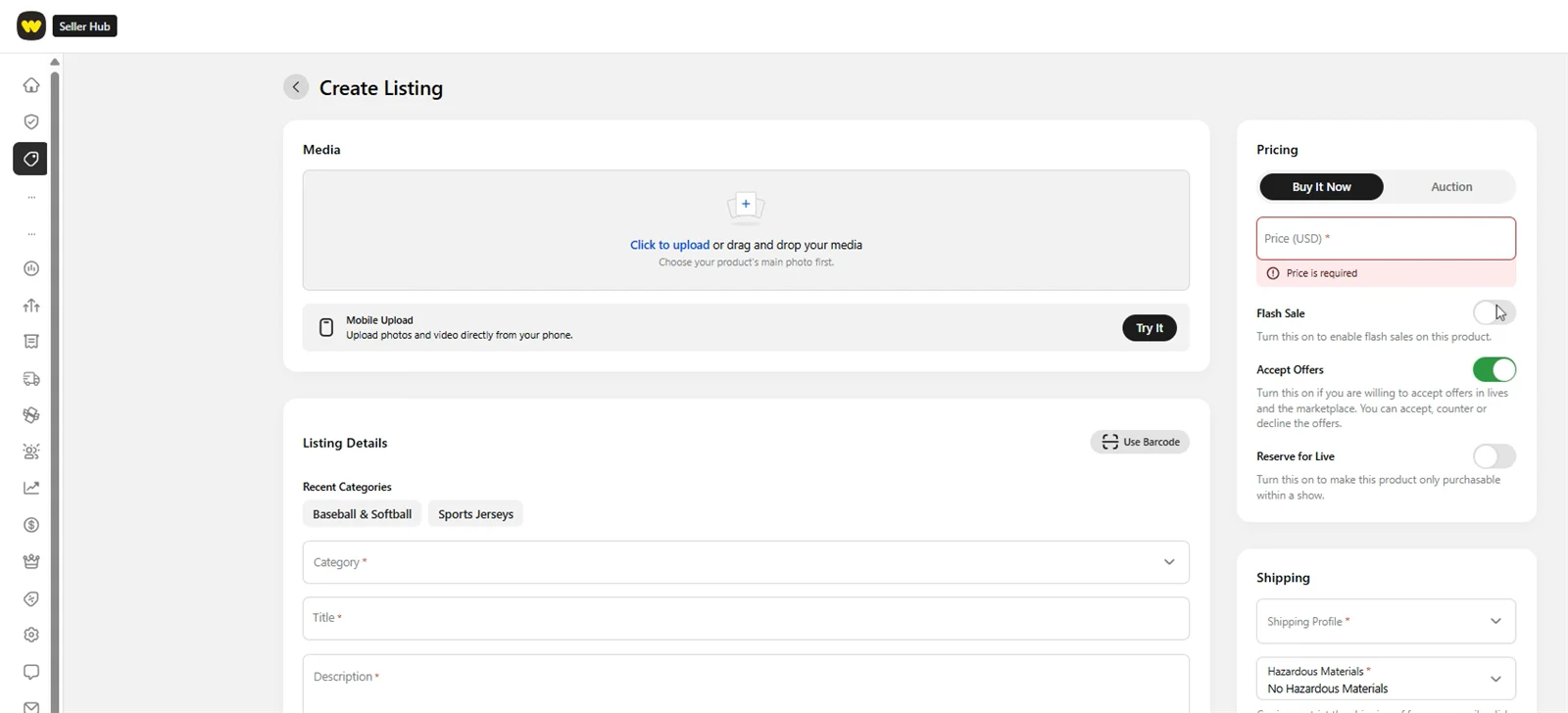
Useful options on the listing form:
- Buy It Now or Auction: fixed price, or let buyers bid during a live show.
- Accept Offers: buyers can make offers in lives and in the marketplace, and you can accept, counter or decline.
- Reserve for Live: keeps an item for purchase only inside a show.
- Flash Sale: a short, discounted sale to create urgency.
- Hazardous materials: declare items such as fragrances or lithium batteries correctly for shipping.
Write titles the way buyers search (brand, item, size, colour), and use a clean main photo. If you sell the same items elsewhere, keep your titles and stock numbers consistent across channels.
Step 4: Plan Your First Live Show
Schedule your show a few days ahead so followers can save it. Give it a clear title, a bold thumbnail and a description of what you will sell.
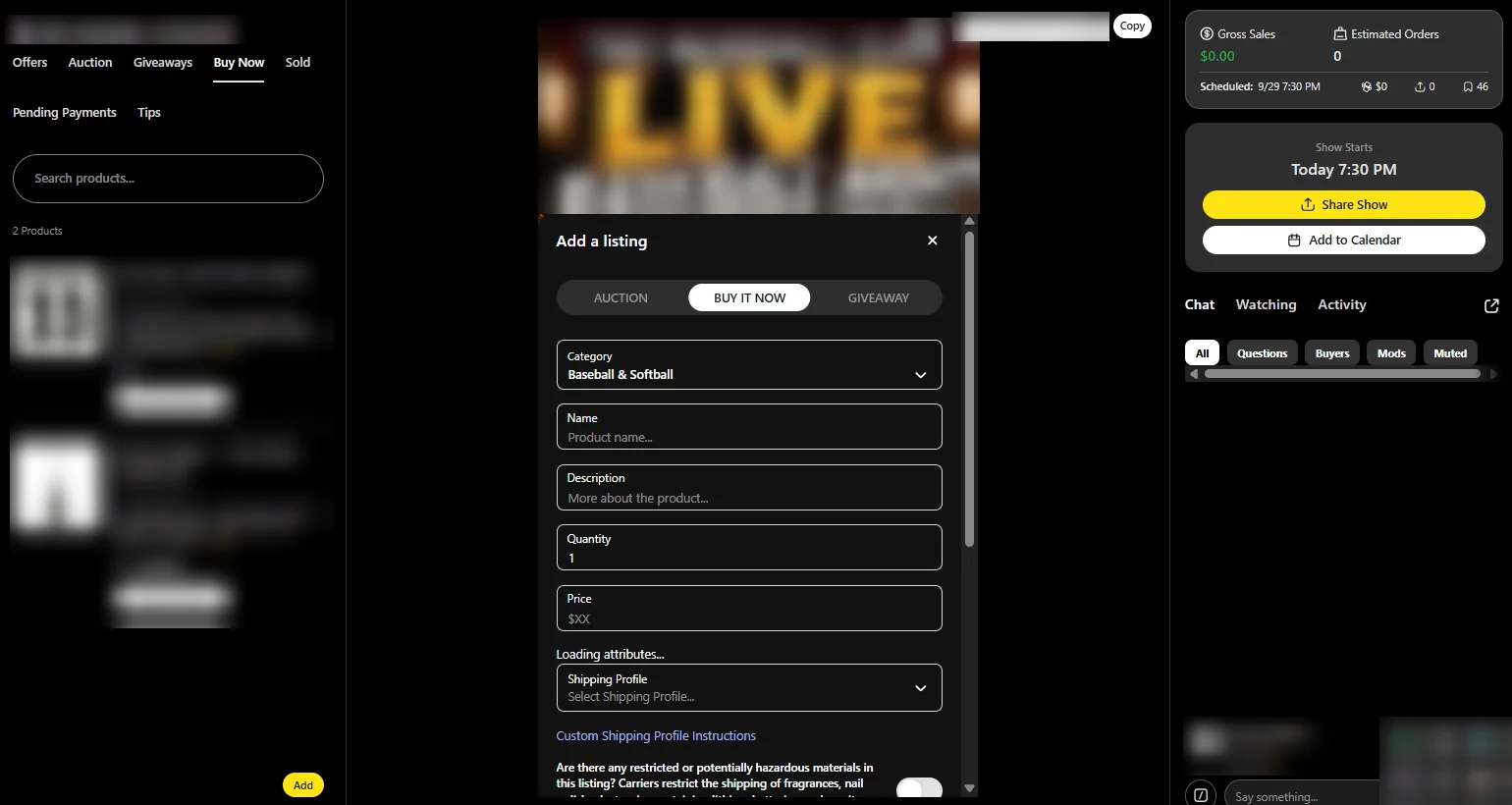
Before going live, prepare a simple run sheet: the order of products, starting bids, Buy It Now prices and when you will run giveaways. Add your products to the show in advance so you can pull them up quickly while live.
Step 5: Go Live and Sell
- Start on time and welcome viewers by name.
- Open with a giveaway for followers to build your audience (check the Whatnot giveaway rules first).
- Keep the pace up: short auctions keep energy high.
- Explain each item: condition, size, why it is special.
- Use a moderator to answer questions in chat, share key info and keep things friendly while you sell.
Step 6: Pack and Ship Fast
After the show, print shipping labels from Seller Hub, pack each order carefully and ship as quickly as possible. Buyers see your rating and average ship time, so fast shipping directly helps future sales. Reply to any buyer messages within a day and solve problems politely.
A simple packing checklist helps: match each label to the order, add a thank-you note, and photograph high-value items before sealing the box.
Can You Sell on Whatnot Without Going Live?
Yes. You can list items as Buy It Now in the Whatnot marketplace and accept offers without hosting a show. However, live shows are where most sales happen, so treat non-live listings as a supplement rather than your main strategy.
Whatnot Fees for Sellers
Whatnot has no listing fees and no monthly subscription. Instead, it takes a commission on each sale (commonly around 8%, lower in some categories) plus a payment processing fee of about 2.9% + $0.30 per order. Altogether that is roughly 10 to 11% of the sale price.
Fees can change and vary by category, so always check the current numbers in Seller Hub before pricing your items.
10 Whatnot Seller Tips for Beginners
- Go live at the same time every week so buyers know when to find you.
- Start with items you know well and can talk about with confidence.
- Use giveaways to grow followers, but set a budget.
- Prepare listings in a spreadsheet first, then add them in one session.
- Use clear, bright photos and show items close up on camera.
- Set realistic shipping profiles by weight.
- Ask a friend or assistant to moderate chat.
- Ship within a day or two whenever possible.
- Track what sold and what did not after every show.
- Keep stock in sync if you also sell on eBay, Amazon or Shopify.
When to Get a Whatnot Assistant
Once you go live several times a week, the work around the show (listings, thumbnails, chat, shipping and messages) can take longer than the show itself. A Whatnot virtual assistant can prepare listings before each show, moderate chat while you are live and handle shipping and buyer messages afterwards, so you can focus on selling.
Free tool: Check your margins before every show with my free Whatnot fees calculator.
Related: Planning your first giveaway? Read the Whatnot giveaway rules for sellers: no purchase necessary, no spin wheels, and you pay the prize shipping.
Official sources: Whatnot Help: How to start selling · Whatnot Help: Apply to sell · Whatnot: How fees work
Frequently Asked Questions
How do I start selling on Whatnot?
Create an account, apply to sell from your profile and wait for approval. Then set up payouts and shipping profiles in Seller Hub, create listings and schedule your first live show.
Can beginners sell on Whatnot?
Yes. Many sellers start with no live selling experience. Begin with products you know, keep your first shows short and use a run sheet to stay organised.
Do you have to go live to sell on Whatnot?
No. You can sell Buy It Now items in the marketplace without a show, but most sales on Whatnot happen during live shows.
How much does Whatnot charge sellers?
There are no listing or monthly fees. Sellers commonly pay around 8% commission plus about 2.9% + $0.30 payment processing per order. Check Seller Hub for the current rate in your category.
What sells best on Whatnot?
Collectibles, trading cards, sports products, sneakers, fashion, toys and other items with passionate fans tend to sell well in live shows.
Can someone help me run my Whatnot shows?
Yes. You can add a moderator or assistant to help with listings, chat and shipping. I offer Whatnot support.
Shipping questions? Read my Whatnot shipping guide for sellers: profiles, labels, bundles and packing tips.
Conclusion
Learning how to sell on Whatnot comes down to preparation and consistency. Set up Seller Hub properly, build a handful of strong listings, plan each show with a run sheet and ship quickly after you go offline. Do this every week and your followers, ratings and sales will grow together.
Whatnot Virtual Assistant
Want help before, during and after your shows? See my Whatnot virtual assistant service and the Whatnot work I have done.
📌 Save this guide for later
Pin it to your Pinterest board so you can find it again when you need it.

About the Author
Rahana Islam
Virtual Assistant & E-commerce Specialist with 7+ years of remote experience supporting businesses in the United States, Denmark and worldwide with WordPress, Shopify, Amazon, Walmart and eBay operations. Level 2 Fiverr seller with a 5.0★ rating from 167 reviews, an NSDA-certified trainer & assessor and the #1 LEDP earner of Dhaka district.
Need a Hand With Your Whatnot Shows?
I prepare listings, moderate chat and handle shipping for live sellers at $5–7/hour.