
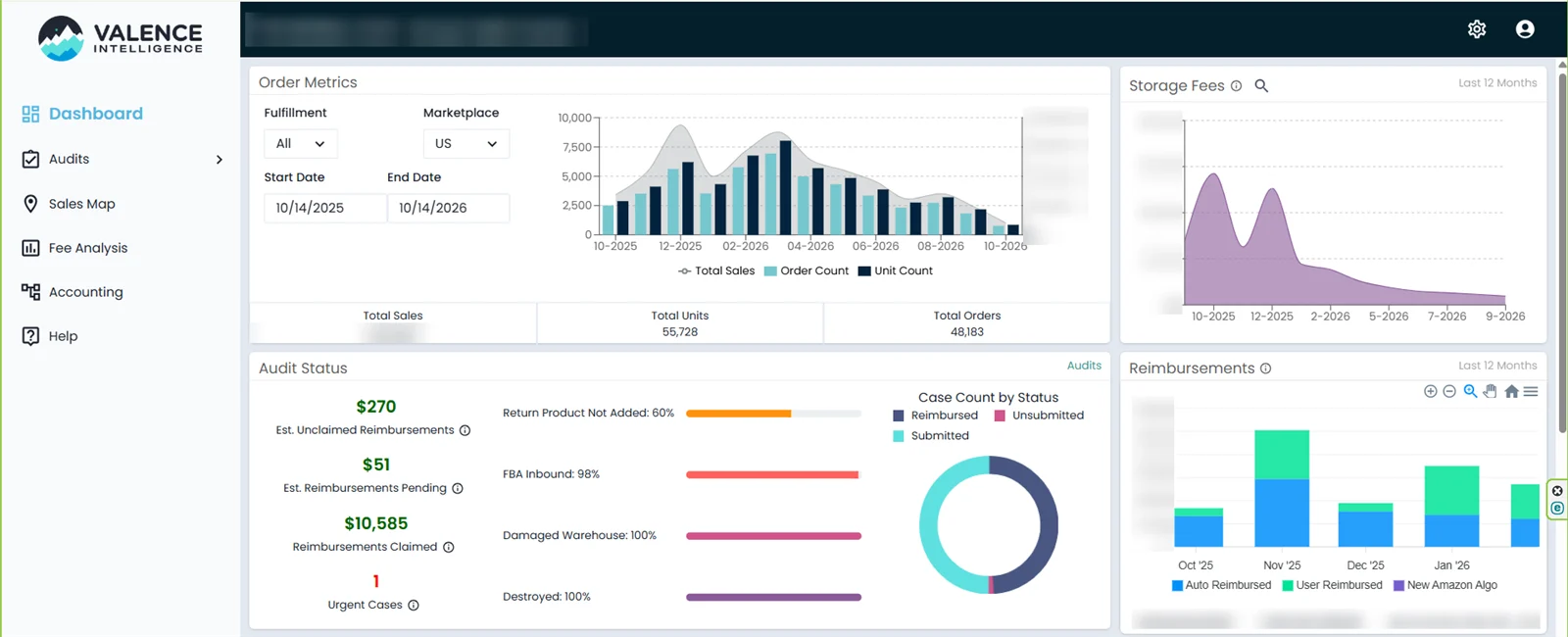
Every busy FBA account loses money to inventory that goes missing or gets damaged inside Amazon’s network. An Amazon FBA reimbursement is how you get that money back. Amazon pays many claims automatically, but not all of them, and the deadlines are now much shorter than before. For one US retailer I helped claim more than $10,000 in 12 months, so here is the exact routine I follow.
Key Takeaways
- Amazon owes you for inventory lost or damaged in its warehouses, missing from inbound shipments, or not returned after a customer refund.
- Claim windows are now much shorter (about 60 days for many claim types), so check every month.
- Reimbursements are based on your manufacturing cost, so keep supplier invoices ready.
- Track every case in a simple log, or use an audit tool like Valence to find what you are owed.
Table of Contents
Real example
See how a store with 48,000+ orders a year recovered $10K+ in FBA reimbursements
What Is an Amazon FBA Reimbursement?
When you use Fulfillment by Amazon, your inventory is in Amazon’s care. If units are lost, damaged by Amazon, missing from an inbound shipment or not returned after a customer refund, Amazon is responsible and should reimburse you, either with cash or by replacing the units.
Many of these reimbursements happen automatically. The problem is that automatic systems miss cases, and the money you are owed quietly expires if nobody checks.
5 Common Reasons Amazon Owes You Money
- Lost in the warehouse: units that disappear in the fulfilment centre.
- Damaged by Amazon: units damaged during storage or handling.
- Inbound shipment shortages: Amazon received fewer units than you sent.
- Customer returns not received: a buyer was refunded but the item never came back, or came back to the wrong place.
- Wrong fees: overcharged FBA fees because of incorrect size or weight.
Important Policy Changes to Know
Amazon has tightened its FBA reimbursement policy in the last two years. According to most seller sources:
- Shorter claim windows: the deadline for many warehouse claims dropped from 18 months to around 60 days, with customer return claims usually allowed a little longer after the refund date.
- Manufacturing cost: reimbursements are now based on what you paid your supplier, not your selling price, so you may need to provide invoices.
- More automation: Amazon reimburses many lost and damaged units automatically, but still check that it happened.
Rules change often, so always confirm the current windows on the FBA inventory reimbursement policy page in Seller Central Help.
How to Claim an FBA Reimbursement: Step by Step
- Download your reports. Use the Inventory Ledger, Reimbursements report and Customer Returns report in Seller Central.
- Compare what went in and out. Look for units lost, damaged, or refunded but not returned.
- Check what was already paid. Match each issue against the Reimbursements report so you do not file duplicates.
- Gather proof. Supplier invoices for cost, and for inbound shipments the packing list, box contents and carrier proof of delivery.
- Open a case. Use the reconcile options in the shipping queue for inbound shortages, or contact Seller Support with clear details for other issues.
- Follow up. Reply quickly when Seller Support asks for more information, and reopen cases politely if they are closed incorrectly.
- Log everything. Keep a sheet with the case ID, date, units, amount claimed and amount paid.
Using an Audit Tool
Doing this by hand works for small accounts, but busy stores benefit from an audit tool. For my client we used Valence Intelligence, which flags returns not added back, inbound shortages and damaged stock, estimates unclaimed reimbursements and tracks case status.
Sellerboard also includes a lost inventory refund feature. Compare tools in my Sellerboard vs InventoryLab guide and see everything I use on my tools page.
My Monthly Reimbursement Routine
| When | Task |
|---|---|
| Weekly | Check closed inbound shipments for shortages and open reconcile cases |
| Weekly | Review the audit tool for new unclaimed items |
| Monthly | Check customer returns refunded but not returned |
| Monthly | Compare lost and damaged units with the Reimbursements report |
| Monthly | Update the case log and report totals to the owner |
Mistakes to Avoid
- Waiting too long and missing the claim window.
- Filing duplicate claims, which wastes time and annoys Seller Support.
- Missing supplier invoices when Amazon asks for cost proof.
- Not checking whether Amazon already reimbursed automatically.
- No case log, so nobody knows what is still open.
Frequently Asked Questions
How long do I have to file an Amazon FBA reimbursement claim?
Amazon shortened the claim windows, and many warehouse claims now need to be filed within about 60 days. Customer return claims usually have a little longer after the refund date. Always check the current policy in Seller Central.
Does Amazon reimburse lost inventory automatically?
Often yes, but not always. Check your Reimbursements report against the Inventory Ledger to find missing cases.
How much does Amazon pay for lost inventory?
Reimbursements are now based on your manufacturing cost (what you paid the supplier), so keep invoices ready.
What reports do I need for FBA reimbursements?
The Inventory Ledger, Reimbursements report, Customer Returns report and the shipping queue for inbound shipments.
Can a virtual assistant handle FBA reimbursements?
Yes. A virtual assistant can audit reports, open and follow up cases and keep a log. I did this for a US retailer and helped claim more than $10,000 in 12 months.
Conclusion
FBA reimbursements are money you already earned. With shorter claim windows, a simple weekly and monthly routine, good records and an audit tool make sure none of it expires. If you do not have time to check every report, hand the routine to an experienced assistant.
Amazon FBA Virtual Assistant
Want someone to find and claim what Amazon owes you? See my Amazon virtual assistant service.
📌 Save this guide for later
Pin it to your Pinterest board so you can find it again when you need it.

About the Author
Rahana Islam
Virtual Assistant & E-commerce Specialist with 7+ years of remote experience supporting businesses in the United States, Denmark and worldwide with WordPress, Shopify, Amazon, Walmart and eBay operations. Level 2 Fiverr seller with a 5.0★ rating from 167 reviews, an NSDA-certified trainer & assessor and the #1 LEDP earner of Dhaka district.
Let Me Recover What Amazon Owes You
I audit FBA reports, open reimbursement cases and follow them up at $5–7/hour.